We got this question from an SEO agency who works on a client and thought that our answer might be useful to others. These services are mass email sending programs – each has different features and applications.
Firstly because they did RSS to email first before others offered the service.
Secondly they were a client for a couple of years – we did a lot of copywriting for them.
Thirdly they do not require double opt-in for new list imports (AWeber does).
Fourthly they enable an autoresponder to end and then you can migrate people onto a mailing list from the autoresponder (so lists mutually build)
Fifthly they allow you to pick a random subscriber for prize draws (very cute)
Downsides of FeedBlitz
Mailchimp and Campaign Monitor do most of these same features. I like the templates in these services better than FeedBlitz’ options.
I also like the mail-as-many-times-as-you-like during a month with FeedBlitz where you pay once and just mail. Whereas Campaign Monitor charges $5 plus every time. But depending on your list size and mailing frequency other services may give you a better price.
You can import a list but FeedBlitz insists on mailing the people and checking they know you’ve added them to a list before you can send messages to them. It has high anti standards.
It doesn’t make creating and managing a large number of lists easy. This is because it’s principally a publishing/sharing platform not a mass email service.
Happy to amplify further or give readers a guided tour inside the services we use most and some of the cute nice-to-have features like who your social media influencers are.
https://creativeagencysecrets.com/wp-content/uploads/2014/04/CAS_Logo_1line_RGB.jpg00Rebecca Caroehttps://creativeagencysecrets.com/wp-content/uploads/2014/04/CAS_Logo_1line_RGB.jpgRebecca Caroe2014-05-07 09:21:032020-01-24 01:44:55What's the advantage of FeedBlitz over Mailchimp?
Newsletters are an essential form of communication between companies and their stakeholders. More often than not though, those that sign up to a newsletter are (potential) customers who are interested in what you do. Many accounting firms are adding newsletters into their regular marketing activities and we’re here to help you build your newsletters for new business success.
We’ve taken time to analyse a couple of newsletters from accounting firms around New Zealand and we’ve noticed one major pitfall – these newsletters are LONG!
They often involve several articles, a lack of links and often their content just isn’t well focused on their business or those who may be signing up to their newsletter.
For a broader picture, lets take a look at the common successes and mistakes some accounting firm newsletters are making…
Successful elements in accounting newsletters
Relevant content: accounting firms are experts in their field and they show that well through the article content they provide in newsletters.
Great use of spacing: the newsletters we’ve seen space out their content well and use headlines or boxes to separate content. Making content discernable is a good thing as it draws readers eyes in and encourages them to read. Content that is jumbled or squished together deters readers, and you should want your newsletters to be read.
Well planned structure: titles, headlines, blocks of content and different sections are commonplace in accounting firm newsletters. This differs from spacing as a coherent structure helps a reader flow from one piece of content to the next, until they’ve read the entire newsletter. It’s simply another way to encourage readers to read all the way through.
Include social media/ web page links: newsletters help drive website traffic, and so integrating links to online presences is vital. What’s more is that accounting firms include these links well by using images. These links are often included in sidebars or at the bottom of the newsletter so as not to distract from main newsletter content.
Common mistakes
Text-heavy/ too much content: often entire pages are included in accounting firm newsletters for any one of the articles they include. This is more so for less frequent, quarterly newsletters than regular monthly ones but does still happen. Entire articles belong on web pages or blogs, and we’ll tell you why after pointing out some more common mistakes.
Content Heavy Newsletters Risk Losing Reader Interest.
Irrelevant or unnecessary content: we’ve seen accounting firm newsletters that point out nearby office areas to buy or that their neighbours or friends are raising money for a charity and would like some help. While this content may be great to share with your readers, it isn’t NEWSLETTER content. Share these bits of information in email blasts to your email lists (possibly including your newsletter mailing list) instead. Your newsletter subscribers subscribed to a newsletter for information about YOU, not about local news.
Lack of an introduction or voice: some newsletters we’ve seen don’t include introductions or conclusions at all. Instead they’re collections of potentially exciting articles lumped into a series of pages. This is a great place for the marketing partner to be the voice of the firm and to give a good face, tone and feel to the newsletter.
No website link backs or calls to action: one big thing missing from accounting firm newsletters to date are links and calls to action. Newsletters do more than inform, yes, but more importantly they exist to bring readers closer to the sender.
Our suggestions / good practice for newsletters
Short is successful: newsletters aren’t books. Newsletters are in fact short notes and pockets of information that a company provides its readers to keep them informed of their expertise and activities. Short is the key word there, and there are many ways to shorten a newsletter while also keeping it informative!
One great way to do this is to post articles or news reels on your blog or website, while linking to them in the newsletter along with an excerpt of the article – this encourages newsletter readers to navigate to your website and helps with google page ranking so that people searching for accounting firms find YOU!
Call to action: while you shouldn’t flood your newsletter with links it’s a good idea to link back to your website in some way shape or form. Getting newsletter readers (people who are interested in YOU) on your website improves the chances of them becoming a future client! You don’t necessarily have to develop a call to action or sales pitch but newsletters a good place to redirect readers to such a thing. A blog (if you have one on your website) is a great example of an opportunity to include articles in your newsletter and include a link back to your website that entices readers to click and read more.
Build a brand, use a voice and provide colour: a newsletter can be the essence of your firm and how you share your company culture with stakeholders. Use it to build a brand by creating a voice and an image! Sidekick Accounting achieves this with their superhero icons and friendly writing style.
Conclusion
In short – accounting newsletters should embrace a short and unique style of presentation while providing links back to their website and social media as they beware of including irrelevant content. If they follow these guidelines it’ll result on a more engaged audience and better chances for turning a potential customer into a full client!
Interested in this article or accounting marketing in general?
Creative Agency Secrets are experts in accountancy firm marketing. We can tutor you and teach you what to do if you want to do the marketing yourself. Or we can do the firm’s marketing for you.
Learn more and join our free Accountants Marketing Newsletter
No related posts.
https://creativeagencysecrets.com/wp-content/uploads/2014/04/2.png281589Creative Agency Secrets Teamhttps://creativeagencysecrets.com/wp-content/uploads/2014/04/CAS_Logo_1line_RGB.jpgCreative Agency Secrets Team2014-04-28 16:31:532020-01-24 01:44:55The DOs and DON’Ts of newsletters for accounting firms
We were lucky to find out about TrustRadius the enterprise software comparison site founded by Vinay Bhagat
Image via CrunchBase
through a search we were doing for clients. As a result, we got in touch with them and secured an interview.
Why did you start TrustRadius?
We’re trying to change the way software is bought and sold. If you’re a consumer who wants to buy a product or service there’s a wealth of information out there. But if you’re trying to buy a piece of technology which could have a huge impact on your career, or business – it’s more challenging; more opaque.
Technology marketers try to control the information flow a customer gets.
Our belief is that through a platform like TrustRadius we can give buyers a more authentic, rapid way to make smarter decisions. It’s not just picking the right product – it’s the right product for your use case.
Every business has unique needs – on TrustRadius you can crowdsource different perspectives about the context around the problem the business is trying to solve. This allows the user to made a more informed choice.
This isn’t trying to provide all the answers. TrustRadius is a layer to get intelligent and get insights, way to avoid mistakes. It’s more than a content layer, it’s a way to allow people to connect with each other. a contextual social network.
What are the issues with other solutions?
The Gartner magic quadrant is not appropriate for everyone.
We have a user who contacted people through the site and did information exchanges to get to the real story behind their tech selection and purchase.
People have tried to do backchannel references for years – it’s hard to get peer input rapidly at scale.
Reviewers have authentication – and we use Linked In – in connect button to verify identities.
What’s your business model?
Today we are not focused on making money – we’re trying to create a trusted at scale network – as a young company we
have to concentrate at this. If we can wedge ourselves between the buyer and seller its a $4trilliion marketplace. We bootstrapped for 1 year and now have raised VC money last June – we maniacally focus on getting to scale through effectively recruiting reviewers, sourcing content and engaging vendors. Read more
No related posts.
https://creativeagencysecrets.com/wp-content/uploads/2014/04/CAS_Logo_1line_RGB.jpg00Rebecca Caroehttps://creativeagencysecrets.com/wp-content/uploads/2014/04/CAS_Logo_1line_RGB.jpgRebecca Caroe2014-04-14 10:00:002023-08-24 13:01:46Interview with TrustRadius founder, Vinay Bhagat
I was at a networking event yesterday and the Sales Lady from Facebook New Zealand was presenting. She made this statement
Google is advertising around intent; Facebook is about demand generation
And it started me thinking.
Google – yes I get it – the intent is shown by your search string.
Facebook’s claim is harder to back up.
Why Facebook’s demand gen claim is slack
The sales lady says that because on Facebook brands advertise to drive likes, then it’s demand generation.
I think because it’s hard to get visitors off Facebook and onto your website where you can actually make prospects take actions that lead them into the sales funnel, the effectiveness of this strategy is low.
The answer today is yes… but. We have great client brands who are successfully recruiting new readers through their Facebook promotion, advertising and status updates. But without a clear set of tactics to drive those readers off Facebook and onto their website, all this work would be hard to monetise.
For many brands, especially B2B, their audience isn’t on Facebook. So it’s irrelevant to their marketing plans.
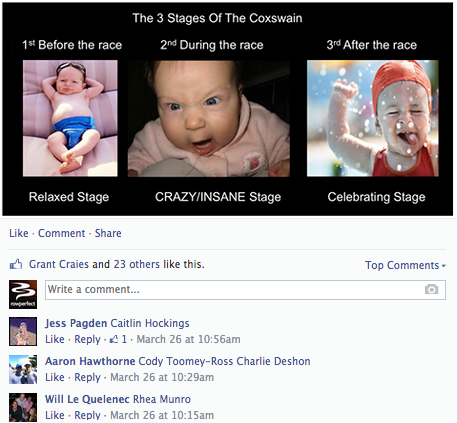
Take a look at this FB post and the comments below. We are seeing readers adding in their friends’ names to their comments in order to draw their attention to this bit of content, and that’s bringing in new visitors.
Social Media is the “in” thing. We often say to our clients – where are your customers? If they aren’t using Twitter or Facebook then why bother using it for business purposes?
No one really likes discussing death and the topics that surround it – so why would they want to even consider it on social media?
That begs the question: how should a Funeral Home use social media, if at all?
Well this depends on a variety of factors – who your market is, what will be successful on social media and on what social media channel you operate in.
Many funeral homes are already exploiting channels such as Facebook to share obituaries and funeral dates. This is of course a useful feature, which should be utilised with social media, but it should not be your only type of content. People will only check your content and follow/like your page if you post content which is interesting and different from your competitors.
Think about where your funeral home is situated
Are you operating in a small town where everybody knows everybody? Then your messages should be more personable and meaningful than a simple announcement. Whether it be a remembrance post (after 1 year) or a death of a previous local, thinking of social media as more than a simple noticeboard is the easiest way to get in the right frame of mind.
Larger funeral homes (which often deal with people they’ve never met before) may find it appropriate to share famous deaths from around the world and share alternative ways to celebrate a life. This will act as a break from the otherwise seemingly continual stream of obituaries.
What sorts of things work on social media
What works on social media? It’s not like you can post pictures of dead people…
Social media can offer potential customers an opportunity to “view” your facilities. Taking photos of all available areas can show off your home and help guide people to your home. The funeral industry is relatively insensitive to price. This means that once they physically view your premises, they usually commit to doing the funeral service there. Therefore, you all that is needed is to get people to visit your home and if seeing photos of it online helps, then it is definitely worth doing.
Social media can help give ideas for other potential customers. Taking photos of other services and posting other ideas of how to celebrate a loved one’s life is another way of adding varying content to your page.
Which channel are you on?
The Social Media channel you use will determine whether what you post will be successful or not. Twitter encourages short text messages with a link whereas Facebook thrives on videos & photos. Pinterest focuses purely on photos, a useful tool if you want to share photos of your home/grounds or beautiful services (which can be shared with attendees).
Ensuring you use the appropriate content for each channel will prevent your social media efforts being frowned upon.
No related posts.
https://creativeagencysecrets.com/wp-content/uploads/2014/04/CAS_Logo_1line_RGB.jpg00Creative Agency Secrets Teamhttps://creativeagencysecrets.com/wp-content/uploads/2014/04/CAS_Logo_1line_RGB.jpgCreative Agency Secrets Team2013-12-02 16:38:472013-12-02 16:38:47Social Media Marketing For Funeral Homes
QR codes enable website linking from mobile phones. And are a simple way to connect your prospects to your physical marketing materials.
They are butt-ugly.
Who wants to ruin a nice design with a pixellated image plonked down in the corner of the page?
We’ve found easy ways to improve the look of QR.
Unitag QR Code Generator Review
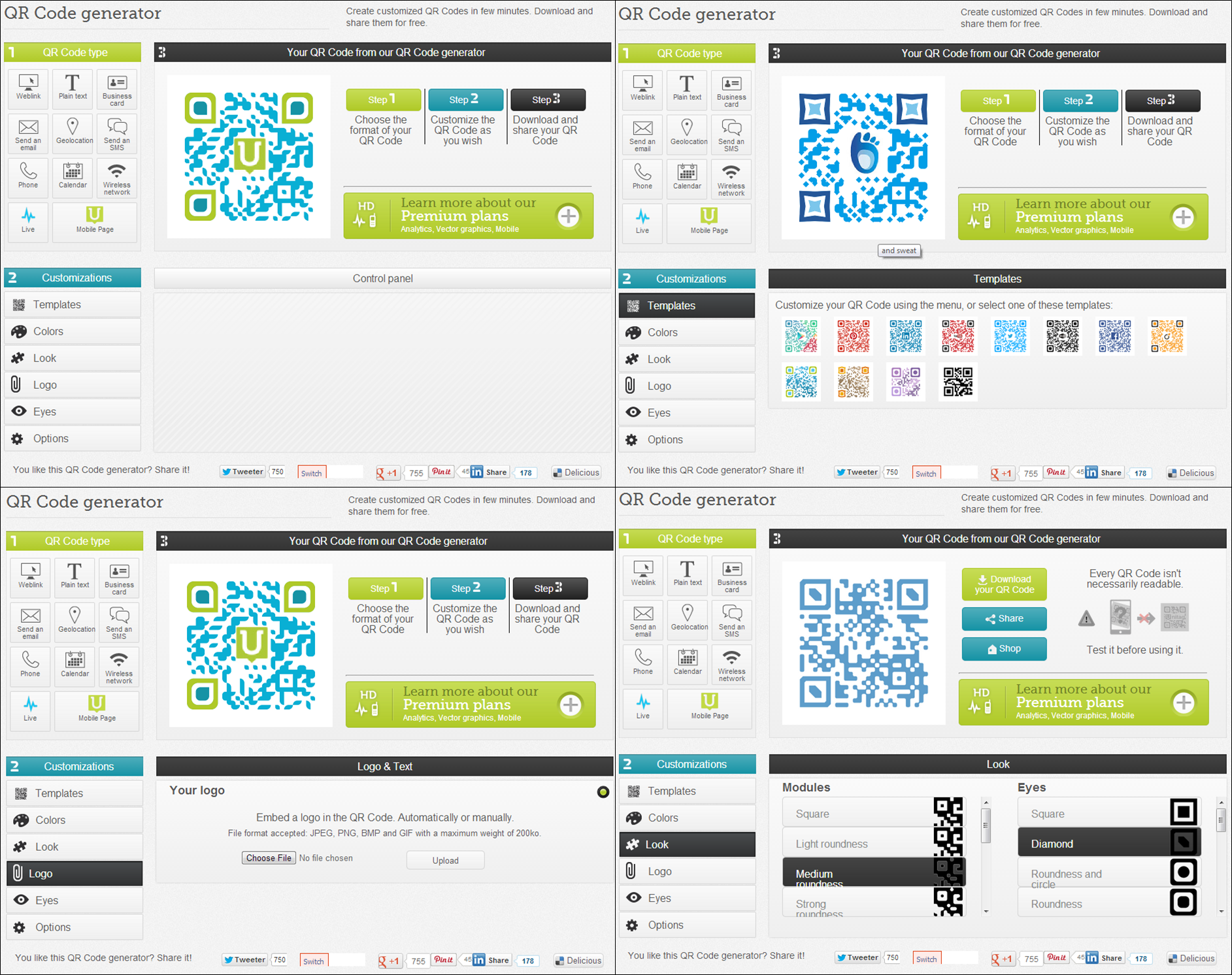
Unitag Live is a website that lets you create and customise QR codes in a huge variety of ways. More free online QR code generators have limited customisation but Unitag lets you add your logo into the code, change the corner images and alter the colours.
Unitag Live Features
The first step in the QR code creation process is picking the website your QR code will link users to. You can send them to a location using the GPS on their scanner or tell their smartphone to instantly call a number. You can even have the QR code call in a business card for the user to look at.
Once you’ve directed users to the right content you can start customising the look of your QR code. Unitag has several predefined template ideas, but gives you the power to alter every aspect of your QR code in a variety of ways.
Colors (American spelling) – allows you to modify the QR code colour. You can also blend two colours into the QR code which gives a shaded rainbow effect across it.
Look – this modifies the shape and style of the corners and main section of your QR code. The main section refers to the dots that make up the code.
Logo – uploading a photo here places that uploaded image in the center of your QR code. Large files cannot be uploaded however so you’ll have to save big images as smaller ones (e.g. reduce the size in powerpoint and re-save it as another picture).
Eyes – this feature changes the colour of the inside and outside of the corners on your QR code.
Options – here you can change the background colour of your QR code, it’s shading and the quality of the image (the size). Be wary of altering this too much because if the background colour clashes with the QR code colour then the QR code cannot be read by scanners (e.g. dark purple QR codes on a dark blue background will not work).
You can also pay a yearly fee to get extended features from Unitag including:
1 or more mobile websites
QR Codes management and storing
High resolution exporting
Template management
Batch generation
Editable QR Code content
Tracking & analytics
Intelligent filter (e.g. different languages)
Multi-user accounts
Statistics per campaign
XLS and CSV export for statistics
Definitely explore the higher level plans if you run marketing campaigns that require heavy statistics tracking. Website clickthroughs and tracking on Google Analytics would more than likely track the same statistics, however.
If you’re looking for a simpler QR code creator online you can also try:
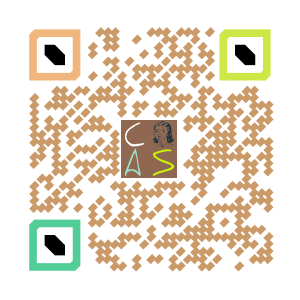
Just to give you an idea of what these codes look like and are capable of, here’s one that leads back to the Creative Agency Secrets homepage!
No related posts.
https://creativeagencysecrets.com/wp-content/uploads/2014/04/CAS_Logo_1line_RGB.jpg00Creative Agency Secrets Teamhttps://creativeagencysecrets.com/wp-content/uploads/2014/04/CAS_Logo_1line_RGB.jpgCreative Agency Secrets Team2013-11-15 15:38:002013-11-12 14:51:40How to make a visually attractive QR code
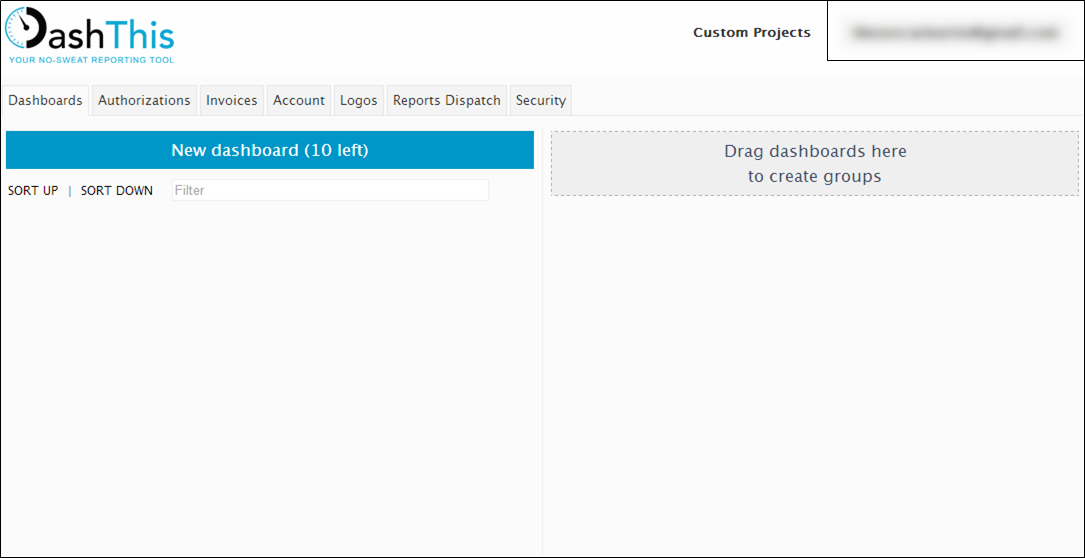
If you’re looking to keep track of multiple social media pages or for a way to track the success of a campaign you’re running you might want to look at DashThis. With DashThis you add in links to your persona around the web (like your Twitter or Facebook account) and then create a “dashboard” of information about them. We recently reviewed DashThis for a client and this is our analysis:
How DashThis works
As an analytics tool DashThis provides in-depth reports on your pages using devices called “DASHBOARDS”. You get acertain number of dashboards per month but can swap them for different periods or social media links, essentially re-using them. Once you have loaded in your page (e.g. Facebook) you can select it when you next create a dashboard. You can customise these dashboards to show the information you want, but you cannot seem to take it further than that and must use what they have built in.
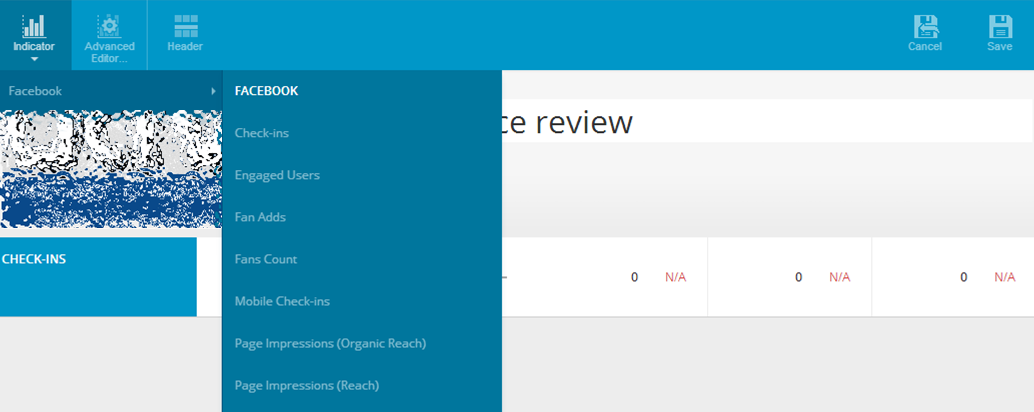
As an example, Facebook pages get stats tracking for things including:
Fan/ like count and increase over your chosen period
Fans added / new likes over your chosen period
Page impressions (views/ reach) over your chosen period
How many impressions were viral over your chosen period
Page interactions (comments, post likes, etc)
Top posts (by various groups e.g. engaged users) over your chosen period
Number of people talking about you over your chosen period
Number of stories about you over your chosen period
etc
Dashboards are versatile and can be used for a variety of statistics. The rolling dashboards are for instant statistics. Periodic reports do just that, report across a set period. Campaign dashboards follow the response your activities have gathered over a given period. This gives DashThis a wider variety of applications outside of just tracking social media page statistics.
Your account
The FREE account ends in just two weeks, which you can extend to a month by sharing DashThis.com otherwise your account will become inactive. From then on you have to pay a monthly fee where you get a number of dashboards starting at 1 dashboard for $19, then 3 for $39, 10 for $99 and so on. This means you can only have a certain number of dashboards active at any one time but you can delete one and recreate it for another page. In that way you could start with 1 dashboard and check a series of reports daily, although this could become time consuming.
Who would DashThis be good for?
DashThis is a comprehensive statistics tracking tool suitable for businesses managing a wide variety of pages, particularly social media pages. In some cases pages have their own tracking systems (such as Facebook on company pages) so if a business has a limited number of pages to track, having them all in one place won’t do them much good.
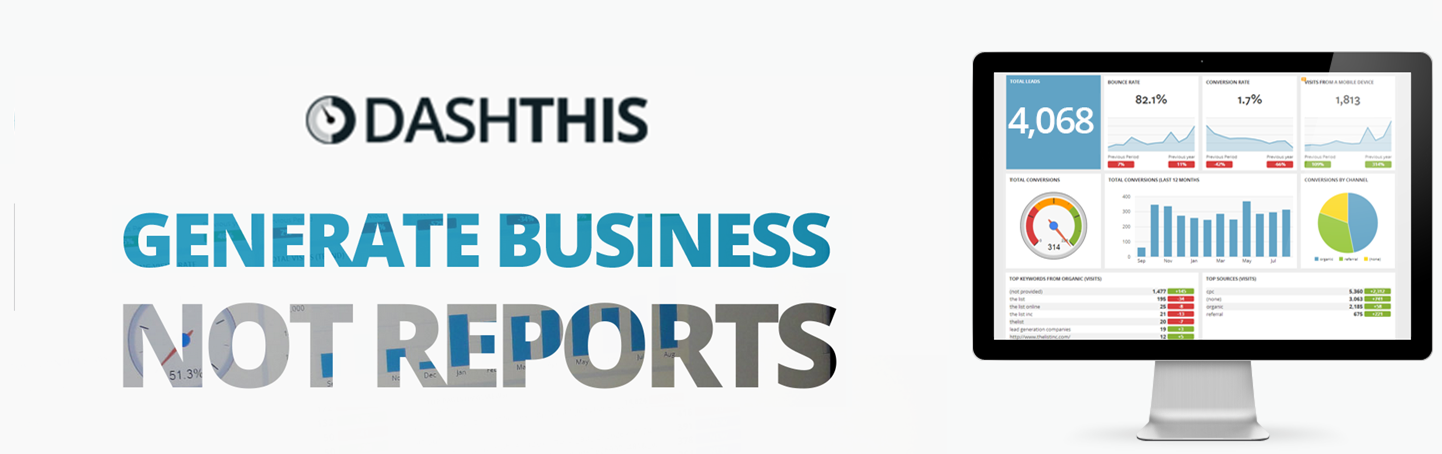
The picture above shows the multitude of pages DashThis supports, including a new way to view Google Analytics.
If you’re a company overwhelmed by statistics tracking on multiple pages you’ll want to give DashThis a trial run. If you already have your analytics figured out it’s best to give this one a miss.
We run a monthly podcast for one of our clients which has become fairly popular in it’s respective industry. This is a relatively new ability we’ve learned and as with everything we do, we’re happy to help others learn to do it as well.
To be clear, when we say webinars or podcasts we mean live audio and video feeds (much like radio if it had view-able PowerPoint slides!) which are broadcast over the internet for everyone to view. We record these broadcasts as we do them and give that recording to viewers afterwards and post them on YouTube or SoundCloud.
Create you own webinar
Very recently we got a tweet from a sports coach wanting to start holding webinars and we answered. We arranged a Skype chat, walked them through the programs and techniques we used and introduced them to other possible solutions we found along our journey of developing a quality podcast. Here’s a summary of our advice.
Our process
We use a combination of the program xSplit and the website UStream:
xSplit – recording a webcam or a computer screen is a simple process today, but controlling that recording is an entirely different thing. The FREE program xSplit provides users with multiple “scenes” which operate like a powerpoint presentation. Each “scene” is like a slide in powerpoint and can be customised with images, live screenshots, webcams and more. It also takes audio directly from your computer and microphone, if one is attached. The program can broadcast to multiple sources and can directly record to your computer as a separate option for making videos. While it is only Windows OS compatible (so no support for Mac computers) it provides a lot of flexibility and control to the user.
UStream – when you are broadcasting you need a destination and a place for that broadcast to be viewed by others. We use our paid account on UStream with ads removed to broadcast our live viewing. UStream gives us a way to communicate with our viewers as well via a text based chat beside the video as it plays.
This set up makes it easy for viewers to watch as we just need to send them the link to our UStream account while we take care of the broadcasting and content. With other solutions you may need to download programs, make accounts or have to send attendees passwords. We have tested some of those solutions and for a wide audience and age range they proved too hard and presented barriers to attendance.
Other solutions you could use
Many of these solutions add a level of difficulty for either us or our viewers to join a webinar that we broadcast. However they may suit your needs better than they suit ours:
Google Hangouts – the Hangouts system created by Google is amazing. It allows you to broadcast your computer screen or your web camera to a live stream (then instant recording) on YouTube. For others to view directly they can watch from YouTube. If you’d like to chat to viewers however they would have to join your Hangout and thus disrupts many of your functions. You would have to mute each attendee if you want to talk and then you could communicate with them via text chat. It works but is cumbersome in it’s design. On the other hand it is a free solution without ads and is simple for basic internet users to learn.
Downloadable webinar technologies – there are meeting simulators that can be used effectively to run webinars such as GoToWebinar or Anymeeting. These solutions are often paid, require you and your attendees to download a program and are designed primarily for corporate use. They will take some training to use (especially for your viewers) but the technology is great. If you’re a businessman looking to run online meetings or training sessions this solution is a great way to go. [only problem with Citrix GoToWebinar solution is the meeting invite does not adjust timezone to the recipient’s calendar]
Now that you’ve got access to the tools, you can start exploring the world of broadcasting and build yourself a webinar! If you’re less technical, or would like to put all of your effort into the quality of the webinar, we’d be happy to take the broadcasting task off your hands. Contact us for more details on these technologies or for a quote on what it would take for us to set up and run your webinar.
No related posts.
https://creativeagencysecrets.com/wp-content/uploads/2014/04/CAS_Logo_1line_RGB.jpg00Creative Agency Secrets Teamhttps://creativeagencysecrets.com/wp-content/uploads/2014/04/CAS_Logo_1line_RGB.jpgCreative Agency Secrets Team2013-10-28 17:00:112022-12-19 11:57:06How to Set up and Host Live Webinars