Email Auto Responders – A Quick Tutorial

I am a fan of email auto responders that send a pre-determined email reply out from your address.  They can be very helpful for new business development as an information tool for prospective customers.

As ever, there are good and bad examples of automatic emails.  Here are four examples we have received recently that can show you the best and worst examples.  Most are from marketing and sales agencies / organisations and so the bad examples make me cry with shame….. there’s so much to improve.

Let’s get to work.

Example 1 – Failure Message

We got this after trying to email J Walter Thompson in Houston, TX.  Their website didn’t list the office contacts so we used a directory called MacRae’s Blue Book.   This is what came back from our email:

Directory Listings fail message

A request for contact that failed.

  • Check and update all the free listings services that have your company and office.
  • Create a unique email address so you can track effectiveness e.g. macraes@jwt.com would have worked here.
  • Contact yourself through them as a mystery shopping exercise at least once a year, preferably 6 monthly
  • Where do email enquiries go?  Which phone number do they list and who answers it?

Email effectiveness 4/10

Example 2 -Zero Information

Membership organisation NYAMA (New York American Marketing Association) whose membership-based services are surely the profit engine for the organisation.  But hey, send them a membership enquiry on their auto form and one week later [hardly an automatic response] this comes in:

Thank you for submitting this form

  • “Thank you for submitting this form.”  Great – send me what I already know I sent you
  • What happens next?  No mention of next steps towards becoming a member
  • Timeliness – this reply came back 5 days after we completed the online form
  • Nothing happened

Email effectiveness 2/10


Example 3 – Inbound Emails

When you send an enquiry in to a company’s ‘general’ email whether by form on the website or direct, what happens to that email?

Everyone knows that spammers and malcontents will be using it too – so what reassurance can you give people that their message has got through?

Great information auto-response

  • This one came from a retail marketing agency fronted by a TV celebrity.
  • They have good information about what to expect from the agency, the celebrity and where to get more information free / cheap and also training
  • But the email came from one general email address – they need to split the contact so people interested in the celebrity and people interested in the agency are directed to different places.
  • We wrote back to confirm our interest in the agency and received the same auto-response again.  Irritating.

Example 4 – the perfect first reply

And finally, a look at a nice, short friendly reponse from a media agency.

Perfect auto response email

  • The message gives a real person’s name as a point of contact
  • Sets clear expectations about what the agency will do next
  • Sounds genuinely friendly

Copy this one.

Autoresponders are a good tool to kick off your online marketing.

 
Simple. How many emails do you write daily? How many blog posts? You only have to write an autoresponder once. It will then go to as many new recipients as activate the trigger. Forever. It will always go out in the same time format that you set up at the start. It’s easy. You don’t have to think about it. And all the while it keeps up a relationship with your readers. Voilà.

And if you need help, let us know! Hire a Creative Agency Secrets team of copywriters to set up your auto responder – we know what we’re doing and can give you the shortcuts to great outcomes and customer engagement.

More With The Creative Agency Secrets GUIDE TO AUTORESPONDERS

The Top 6 most popular articles of all time

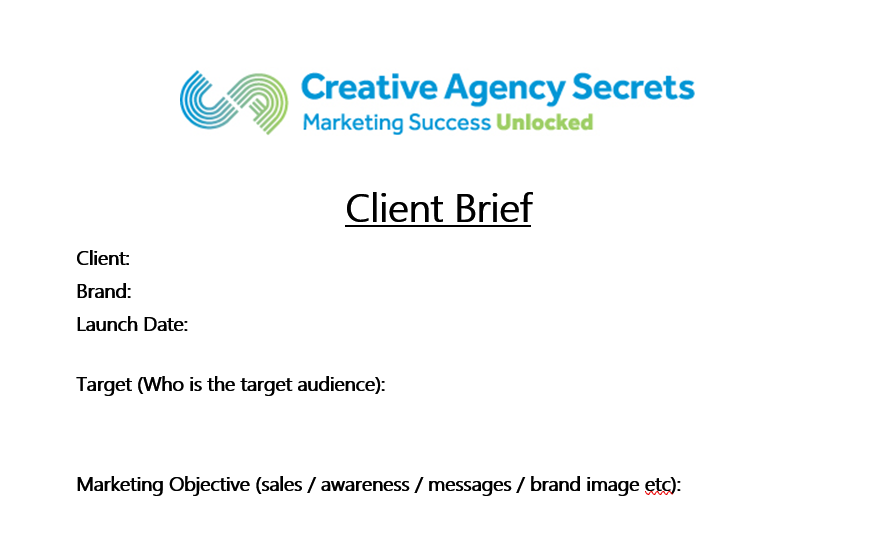
What Does A Client Brief Look Like?

Thanks to Dawn who wrote in asking “What does a client brief look like?” 

Let us help you out.

What to do when hiring an agency

If you sub-contract your marketing to an agency or to freelancers, you want to be sure that you pay for and get good quality work.

A lot of the quality of output is due to high quality input.  By that I mean, briefing documents.  If you can explain clearly what you want, how you want it done and timeframes, you are far more likely to get high quality work back.

We use Upwork and People Per Hour to find freelancers and expert sub-contractors.


Ask the freelancer to write back

For briefing we always give a lot of detail and we also ask the freelancer to write back with answers to our questions.

We choose these carefully in order to show us that THEY have read the brief.

  • Please tell me what access permissions you need before you start the job

And we also ask them open questions whose answers tell us if they understand the scope, how they would approach the job and allow us to assess how good their English is.

  • Estimate how long the job will take
  • Tell me what problems you anticipate

Below is a template document which we use when we receive instructions to do some marketing for our clients. You can download it from the link.

Each sub-heading is self explanatory – as a client you should fill in each section as clearly as possible and then send it out to the agency or agencies you want to work with asking them to send you price quotations.

Alternatively, you write longhand what you want and the agency will fill in the gaps in the document.  Then you should approve it before instructing the work.

DOWNLOAD Master Client Planning Brief Template

The Top 5 most popular articles of all time

How To Introduce A Business By Email

Connecting two compatible businesses with each other can be one of strongest networking tools for you and other businesses. By connecting the groups, not only are you solidifying your own network, but also helping the two businesses who may be able to benefit each other.

But often times this can be difficult over email.

In my networking group, we’re working hard to make it really EASY for members to introduce each other to new prospects and new clients.

I was asked by the group to help coach them in the best way to write an introduction that others could use.  So let’s say you wanted to introduce my firm to another business. Here’s how you would do it.


Hi [their name],
I just wanted to connect you with Rebecca from Creative Agency Secrets. I know you were interested in increasing your business’s online presence, and I’m sure they’ll be able to help.
Creative Agency Secrets is an expert in marketing and promoting businesses using traditional and online methods.  They work as the outsourced marketing team for busy businesses doing marketing that starts conversations and leads to sales.
I have seen their work for [name a client] and used them for my own business to write the copy on our website About Us page.  And I’ve also recommended them several times and had great feedback especially about their careful attention to detail.
I will leave you two to connect – I’ve spoken to you both about each other and shared your emails and phone numbers below.
[both parties’ contact information]
Best,
[Your Name]

The 5 elements of an effective email introduction

  1. Introduce: explain why you sent the email
  2. Start: with their one-liner…. who are they and what do they do
  3. Build: with an example of their work for someone you both know, preferably.  If you can’t say you have worked personally with them, a mutual acquaintance is a positive reinforcer.
  4. Memorability: Add an anecdote that describes your experience – if you can make it funny, cute or WOW that’s best but not strictly necessary.
  5. End: Include all the information they need to continue a dialogue without you….
    We plan on creating a shared document for everyone so they can cut/paste the text into emails for business referrals for new business development.

    The best introductions are when you’ve spoken personally to both parties.  NOTE not emailed, spoken….

    The Top 5 most popular articles of all time

The (b)leading edge of Accountancy marketing

Sage publishes an annual survey of accountants attitudes – what’s interesting is that it is global and the summary report details some good findings about the profession.  It’s called The Practice of Now 2018 

As a marketer who works with professional services businesses, my reading highlights some big numbers in the research about artificial intelligence, fear of competition, lack of optimism and increasingly demanding clients.  The implications for marketing, I will cover at the end of this article.

10 take-outs from the Practice of Now 2018 report

  1. Clients are changing faster than accountants. – 42% of clients expect accountants to provide business advice.  This shows how frontline accountancy is in the mind of the client and how banks and business mentors have failed to take up the slack here, which is an opportunity for growth.
  2. Revenues rise as cloud accounting allows firms to be more productive.  56% of firms saw a revenue rise.  If your firm didn’t see this fee income growth – start to review your working practices.
  3. Practice Management in the cloud is at 53% adoption – clearly we are into the mainstream majority now.
  4. But confidence is lower – 40% feel less confident about the prospects for their practice.  Clearly Xero’s goal of putting accountants out of business is realistic and beginning to come true.
  5. Competition within the industry is more visible – are you buying up a practice from a retiring competitor?  Clients will go to an accountant who serves their needs – even to another city or country.  This is both a threat and and opportunity for new business development.
  6. Artificial Intelligence is helping free up administrative tasks and it’s more than just automation. Moving from data entry, email and diary management to higher value services is a no-brainer… but how to set it up is the challenge as these skills aren’t in-house and they may not be in the IT services organisations who work with accountants either.
  7. Most accountants are doing some workflow automation – 49% want to do more of it.  So the benefits are noticed (see 2 above).
  8. The language of accountancy is changing – “Tell me how much money I have” and “How much am I owed?” is SO refreshing compared to “debtors, creditors and accruals”.  From a marketing point of view, these messages are very powerful and simple – but does your firm use this language?
  9. Advisory services are wanted by 42% of clients – but if you don’t market & position the firm to capture this revenue, clients will go elsewhere.
  10. The BIGGIE – 67% of accountants say that cloud technologies make client collaboration easier. Phew, glad that worked out because it jolly well ought to be this way.

Should I worry about artificial intelligence?

If you’re not sure what A.I. could do for your business, start asking questions now.  Because we all understand automation in things like bank feeds, this is a very small part of the working practice move towards higher functionality for humans and lower functions for machines (or software robots).

The easiest way to understand the potential for AI in accountancy is this extract from the report

“Candidates for automation already include assigning incoming bank statement entries with the correct nominal codes—via training the machine becomes able to predict what codes should be used—but in the near future the power of AI to learn means it will become involved with operations like analytics and report creation. For example, software will be able to predict a client’s cash flow based on the company’s previous behaviour. Based on self-generated data, AI will be able to make predictions and decisions. This isn’t limited to client data. By examining things like seasonality data, AI can help with practice management. AI and automation aren’t just desirable because they make life easier. Research has suggested that the tedium of repetitive tasks can lead to a high staff turnover, introducing additional costs for a practice such as recruitment and training. Automating these processes makes complete business sense.”

It goes on to say

“AI can flag the anomalies, saving time and resources, making the accountant more productive.”

Your strategic marketing pathway

And as a marketer, if I am advising a modern accountancy practice this is what they should be doing for strategic marketing.

Firstly get your brand positioning updated to reflect modern working.  Think Nena and Kim Wilde – “Anyplace, anywhere, anytime” and you’ll be on the right track.

How that branding plays out into your collateral, positioning, services and online profile should be straightforward.  The key is to get the strategy right first and the rollout should be clear.  You will need new keywords for SEO, your client communications will become driven by client preference and choice and your language will simplify and align with clients’ choices of words. 

Other than that, it’s marketing business as (un)usual for a modern accountancy practice. 

How to Migrate to Digital Marketing

Migrating to digital marketing from traditional marketing is a question I get asked frequently.  Giving a talk to the Te Atatu Business Association, I was able to showcase both business to business (B2B) and business to consumer (B2C) examples of ways to work out these things

  1. Where to start your digital marketing
  2. Which marketing methods will work best for your business
  3. What communications will work best for your clients and customers

The resources on the last slide are worthwhile saving / bookmarking.  They relate to directory listings and tips for local marketing.

Featured on the 302 Temp Redirect show

Thanks to Glenn Marvin of Konnector who interviewed me on his 302 Temporary Redirect Show (that’s a geek joke – a website has a 302 error code…. ).


5 key activities for B2B Marketing

During the show Glenn asked me what my “always on” fundamental B2B marketing activities are.  If you want to listen it’s at 18:25 through to 20:24.

  1. Database of clients, suspects and prospects.  Regularly updated.
  2. Regular communications to your database
  3. Trade shows and local in person meetups
  4. LinkedIn to recognise the names of people in your industry – and LinkedIn Sales Navigator
  5. Speaking at conferences, events and being a PR spokesperson for your trade magazine.

Business Accelerators in New Zealand

In doing market validation research for a client, we researched the Business Accelerators who are best known in New Zealand.  Since I couldn’t find a place where they are all listed, I thought I’d create one.  [We did this before for Youth Entrepreneur Organisations in New Zealand].

The Mums Garage group have pulled together a pretty comprehensive “Startup Ecosystem Map” list which goes from pre-seed investment upwards including regional connections – highly recommend as they encourage you to submit additional resources not yet on the list.

Check out these as a starting point for your own individual needs.  And please use the comments to add others to the list.
local directories

Boost Your Business with Local Directories

Don’t let your business get lost in the crowd

Yellow pages directoriesIt’s that time of the year again where we remind you about the benefits of good ol’ directories! Before the internet, we relied on finding services through the big yellow brick of a book we received each year. Thanks to the world wide web, we now find them stuffed under uneven table legs or as a booster seat. Today we find what we’re looking for with a click of a button. Does your business stand out?

In 2016, Google took away the right-hand sidebar where the paid adverts were displayed. Now the paid posts soar straight to the top, making it a tough battle for smaller companies to get noticed. Directories can be a cost-effective way to help get found via search engines. Being active on directories increases the chances of your business getting noticed.

Why updating your information is vital

yelp directoriesIt is important to keep your business updated in directories. If your business has gone through a recent change and you didn’t update your information, you could lose a lot of potential customers!

Never forget to NAP, this means not sleeping on the details. Make sure your Name, Address and Phone data is accurate and up to date. Location and accessibility are two of the most important factors when it comes to customers. If your telephone number is an old one and a customer can’t get through to you, they’re unlikely to try again. Likewise, if you were to put your address as a small town in South America, a New Zealand customer wouldn’t follow up with your business!

Pro tip: Check the directories your company is listed in and confirm your details are correct. Some websites take their information from others; resulting in a cycle of incorrect information.

Updated List of Directories*

This year, we bring you an even bigger list of potential directories your business may be found in. Take a look to see where your business is listed and where it isn’t.

It’s the only thing standing in between you and your next big client.

NB: Not all directories will apply to every type of business, some are more specific to particular fields. (eg. Tripadvisor will benefit restaurants and hotels over a telecommunications company.)


*The directories list has been ranked by domain authority, with the highest ranking at the top (accurate as of July 2018).


New Zealand Directories


RateBeer – Directory of beers, breweries, bars and stores.
Express Business Directory – Business directory.
Yellowpages NZ – Search for anything in NZ .
Enroll Business – Browse through local businesses and services of New Zealand.
MyHuckleBerry – Business directory.
Finda – Find anything in NZ.
Info News – Directory connected with membership and news.
Wises – Services based off an interactive map.
Hotfrog – A site where people register their businesses for free.
WowCity – Lots of different listings including hotels, real estate, stores, services and health. Get all this information by selecting a city.
Lawlink – Connect and share with attorneys around the world.
Neighbourly – The easiest way to keep up with everything in your neighbourhood.
NZPages – Collection of sites of all kinds and purposes.
NZ Search – New Zealand businesses and sights.
Localist – Local and authentic Kiwi businesses. [2020 no longer listing]
Zoomin – Businesses broken down by New Zealand city.
Zenbu – Collaboratively edited directory of businesses and places that help you find anything, anywhere.
ZipLeaf – Online business directory.
PathLegal – Directory for lawyers.
BusinessMe – New Zealand business directory. [2020 no longer live]
Cylex – Business directory of New Zealand.
Fyple – Efficiently sorted local businesses and services.
Local Store – Local stores with updated listings.
My Wedding Guide – Everything about weddings.
RankedByReview – Find local businesses with the best reputation.
MySheriff – Does all the work in finding the best service for you.
LocalBD – A local business directory. [2020 no longer live]
Search Local – Site with all kinds of companies and businesses listed. [2020 no longer live]
New Zealand Websites – New Zealand business websites. [2020 no longer live]
NZ Localizer – A directory with many New Zealand companies.
New Zealand Search – Directory of websites, a search engine and New Zealand articles.
Homeimprovement2day – New Zealand companies for home improvement.
99Nearby – The latest listings of local businesses.
The Local Business Network – Free listing of your business and a paid versions with enhanced SEO.
OpenDi – Business directory.
Directory Pages – Local directory with a premium category option.
NZ Blue Page – Business list based on city and map.
NZ Business List – Business listing by category and city. [2020 no longer live]
Opening Hours – Local businesses and their hours of operation.


International Directories


Google+ – Google’s social media platform.
LaCartes – Find anything. From local activities to exotic destinations. Worldwide site.
Maps Connect – Add or update your company details to Apple Maps so customers can find you.
Yelp – Directory of a wide range of services and businesses. Worldwide.
Issuu – Articles about businesses and services all around the world.
Foursquare – Find best places to eat, drink, shop or visit.
Community Walk – Create a walk in a neighborhood and find businesses nearby.
BrownBook – Global business listing database.
Tupalo – Find the best spots in your surroundings and see what other people think about it.
2FL – Local businesses worldwide.
Yello Yello – Global business directory. Helpful to find out what’s going on in your city.
Spoke – Business information.
Sales Spider – Site with multiple purposes. Lots of reviews and products but also business directory. Has a community on site.
Kompass – Businesses worldwide (requires tax/vat number).
TripAdvisor – For things to do on your trips. Claim your business at https://www.tripadvisor.co.nz/Owners.
Zee Maps – Create and publish maps of business lists.
CallUpContact – A directory based on maps
Link Centre – Internet directory and search engine.
Viesearch – Find the most popular businesses based on 5 star ratings.
Cybo – Business directory with a wide range of categories.
Where2go – Business directory.
Find Us Here – Global business directory.
Factual – Location data company.
Lekkoo – Give a street name and find anything around there.
Epage – Free classified ads and business options.
iGlobal – A global community of businesses, professionals and events.
So Much – A link directory without ads.
Expatriates – Classified ads for expatriates.
Top Design Firms – Reviews and rankings of top web design firms, ecommerce development, graphic designers and design agencies around the world.
CompanyFM – Create a page to promote your company and brand, showcase your product or service, expose your content, build customer loyalty, or just be found.
Wand – Worldwide directory of businesses.
Place Reference – Place yourself on a map and see what’s around you (with the list and streetview).
BeanHunter  – For finding the best cafes and coffees in various cities.
Fonolist – Find businesses, events, and reviews. Narrow it down by the country and city you’re looking at.
Local Wall – Free classifieds and advertisements worldwide.
Places Map – World places map directory.
Nettica – Online directory of products and services worldwide.
College Zoom – College directory with reviews and achievements.